Introducing ChatPilot: one inbox for all your chats, with Claude
Most of us now run our work through five or six chat apps. Clients on WhatsApp, the team on Slack, suppliers by email, friends on Telegram, family on iMessage. Each one has its own unread badge, and the message that mattered is always in the app you didn't open.
ChatPilot puts all of them in one inbox, on your own computer, and gives you Claude as an assistant in every chat you choose.
What it does
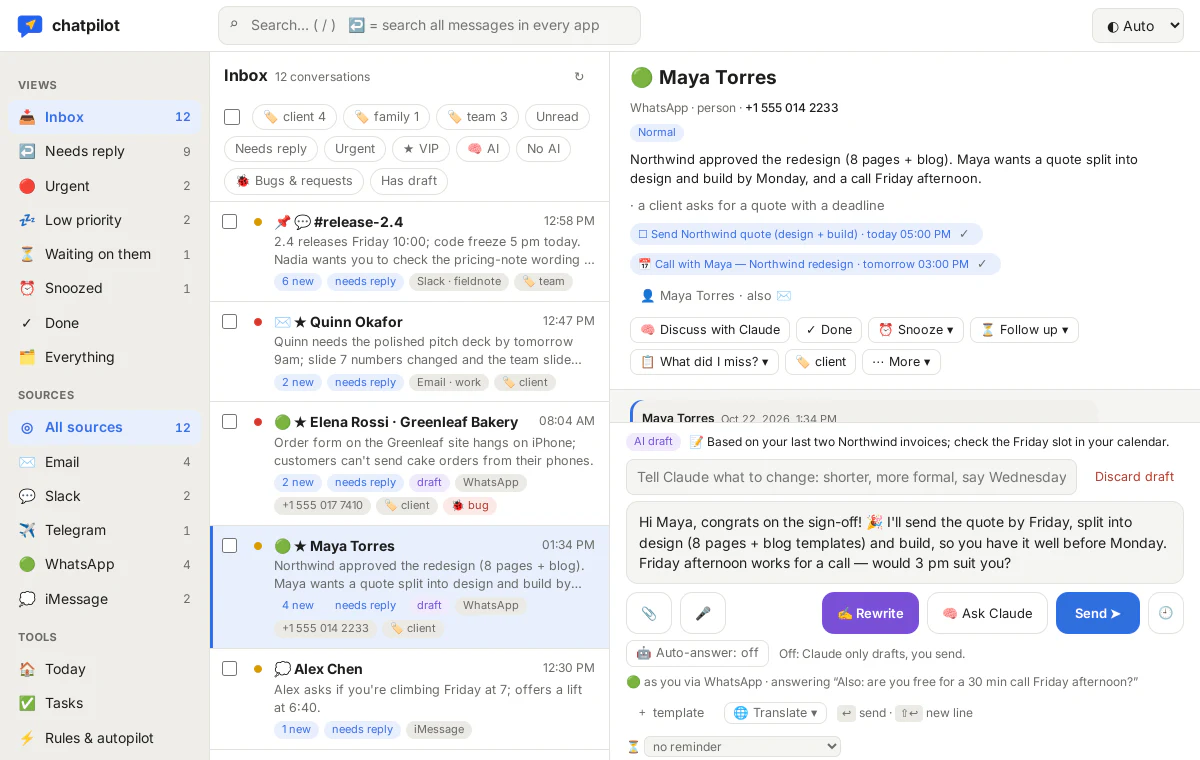
- Sorts what comes in. Every new message is marked urgent, needs reply or low, with a one-line summary. Urgent ones reach your phone through your own Telegram bot; the rest waits, sorted.
- Drafts replies in your style. Claude reads the conversation and your own earlier messages and writes a reply that sounds like you. You change a word and press Send.
- Tells you what you missed. One click summarises a busy group or a long thread: what's for you, what was decided, what's left to do.
- Keeps track of promises. “I'll send the quote Friday” becomes a task. Follow-up reminders tell you when someone hasn't answered.
- Lets you think out loud. Discuss any chat privately with Claude. It can read your own files and, if you connect them, look things up in your back office.
Built so you stay in control
ChatPilot isn't a cloud service. It runs on your Mac, Linux machine or Windows PC, and your messages stay in a database there. Every chat starts switched off: you decide per chat whether ChatPilot may keep it, and whether Claude may read it. Nothing is sent until you press Send, and Claude can only read your files and data, never change them.
Claude runs on your own Claude subscription through Claude Code, so there's no separate AI bill.
If you want Claude to answer in a chat while you're away, you can switch on the autopilot for that chat. It introduces itself as your AI assistant, marks every message, keeps to a daily limit and steps back as soon as you write yourself. More on Privacy & safety.
Private beta
ChatPilot is in a private beta for macOS, Linux and Windows (iMessage and SMS need a Mac). Join the waitlist below and we'll send you an invite with the setup guide.