Local AI: keep a chat on your own computer, AI included
Some chats are too private to send anywhere, even to an AI you trust. ChatPilot now has a setting for exactly those: Store + local AI.
A fourth choice per chat
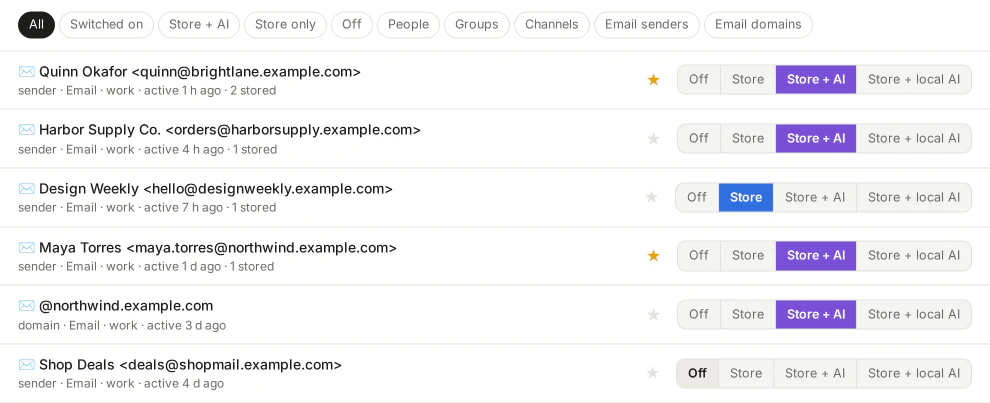
Every chat in ChatPilot starts switched off, and you decide what happens to it. Until now there were three choices: off, Store (kept on your computer) and Store + AI (Claude may read it too). The new fourth one is Store + local AI: the chat gets sorting, summaries and drafts, but only from an AI model that runs on your own computer. Nothing of that chat goes to Claude.
That rule is strict. If your local model isn't running, ChatPilot waits for it. It never falls back to Claude for those chats, and features that combine several chats, like the morning briefing or learning your writing style, leave them out or run locally.
Which models
Under Access → AI you can add a local model from Ollama or LM Studio, or another AI service with an OpenAI-compatible API. Then choose which tasks it takes over for all your chats, if you like: sorting and alerts, summaries, translation, drafts, discussions, learning your style, the morning briefing. Everything you don't move keeps using Claude.
One thing to know: the “local” slot is simply the model you add there. If you point it at an online service instead of Ollama or LM Studio, your Store + local AI chats go to that service. Keep it on your own computer if those chats must stay there.
What to expect
Local models are free and private, but slower and less sharp than Claude, especially for drafts. A good split for many people: Claude for most chats, and Store + local AI for the handful that should never leave the house.
See Privacy & safety for everything that does and doesn't leave your computer.