Use your own AI: ChatPilot now works with ChatGPT models, Gemini, Grok and more
Until now ChatPilot thought with Claude, through your Claude subscription. That's a good default, but plenty of people already pay for another AI. From today you choose.
Pick your main AI
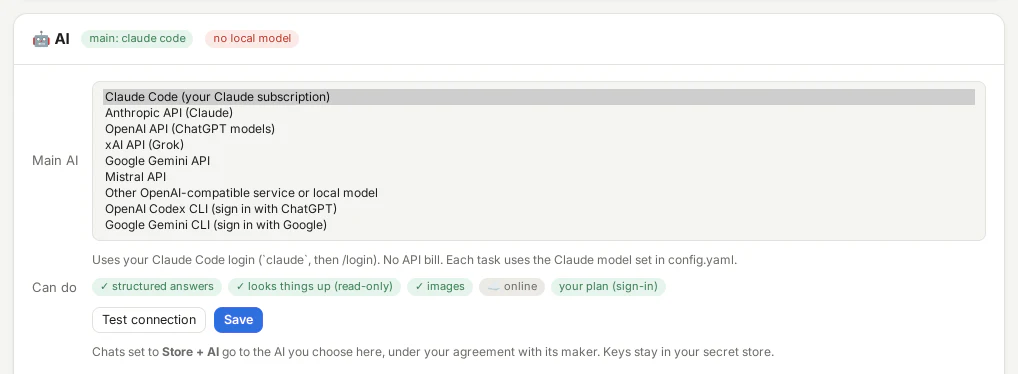
In Access → AI there is a new choice: the main AI, the one that sorts your chats, drafts replies, summarises and talks things through with you. The options:
- Claude through Claude Code and your Claude subscription (still the default), or through the Anthropic API with a key
- ChatGPT models through the OpenAI API, or your ChatGPT plan through the OpenAI Codex CLI, signed in with ChatGPT
- Gemini through the Google Gemini API, or the Gemini CLI signed in with Google
- Grok through the xAI API, and Mistral through the Mistral API
- Anything OpenAI-compatible, including a model on your own computer with Ollama or LM Studio
Pick one, let Find models list what the service offers, paste a key if it needs one (it goes into your system's secret store) and press Test connection: one tiny call, nothing saved, so you know it works.
Subscription or key: what that means for you
With Claude Code, the Codex CLI or the Gemini CLI, ChatPilot uses a program you signed in with the plan you already have, so there's no extra bill; it counts towards that plan's limits. With an API key, the AI's maker bills you for what you use. A local model costs nothing and keeps everything on your computer, but is slower and less sharp. ChatPilot itself never bills you for AI. The details per AI.
Everything still works, with the same limits
Not every AI can do the same things, so the card says honestly what yours can: answers in ChatPilot's own format, read-only lookups, pictures, and whether it runs on your computer or online.
The lookups matter most. With Claude Code, Claude reads the folders you allow and the read-only tools of your connected systems itself. With every other AI, ChatPilot now runs those lookups for it: the AI asks for a file or a figure, and ChatPilot checks the request and runs it, with the same folders, the same client bindings and the same account checks. There is never a tool that writes. The client card and the CRM hub don't involve the AI at all (ChatPilot reads them itself), and for the autopilot's live figures the AI only ever asks: ChatPilot does the lookup for the chat's own account.
Your chats go where you send them
Chats on Store + AI go to the AI you chose, under your agreement with its maker. Chats on Store + local AI still only ever use the local model you added, even when your main AI is itself a local server. And the AI still can't change anything: actions in your systems only run when you press Run. More on Privacy & safety.